Changelog
We ship product updates weekly. Follow us on 𝕏 for the latest.
Management SDK (beta)
·
·

We’ve released a strongly typed TypeScript SDK for interacting with your Reflag account. It provides a simple, maintainable way to integrating Reflag flag management into your backend services.
What’s included
This initial release focuses on core feature flag operations:
- List flags: Retrieve all feature flags in an application
- Create flags: Define new feature flags
- Toggle flags for companies: Enable or disable features for specific companies
- Toggle flags for users: Enable or disable features for individual users
With the SDK, you can automate workflows that previously required manual API integration.
Use cases
- Integrate feature control into internal tools (e.g. back-office systems)
- Allow users to opt into experimental features directly from your product
See the Customer Admin Panel example for a practical implementation.
How to use it
Toggling a feature for a specific user is straight forward:
import { Api } from '@reflag/management-sdk';

const reflag = createAppClient("app-123", {
  accessToken: process.env.REFLAG_API_KEY,
});

// enable 'new-checkout' for 'user-1'
const updatedUserFlags = await reflag.updateUserFlags({
  envId: 'env-456',
  userId: 'user-1',
  updates: [{ flagKey: 'new-checkout', specificTargetValue: true }],
});
See Common Workflows for more examples
Renaming our APIs
·
·
We've renamed our APIs. The APIs were previously called the Public API and the REST API. We renamed them so they are now called the Runtime API and the Management API.
The Runtime API is the one your application talks to at runtime to fetch flags for users.
The Management API is used to manage your Reflag account, including listing flags, updating targeting etc.
See the API Access docs for the full picture.
Notification policies for Slack and Linear
·
·
When your team updates feature flag targeting, not every change needs the same level of visibility.
Reflag can notify your team in Slack or Linear when targeting changes. Some updates are worth broadcasting everywhere. Others are minor tweaks that don't need to ping Slack or add another comment in Linear.
And if you work across multiple environments, the right default usually isn't the same for production as it is for staging or testing.
To make that easier to manage, we've added Notification policies in App Settings.
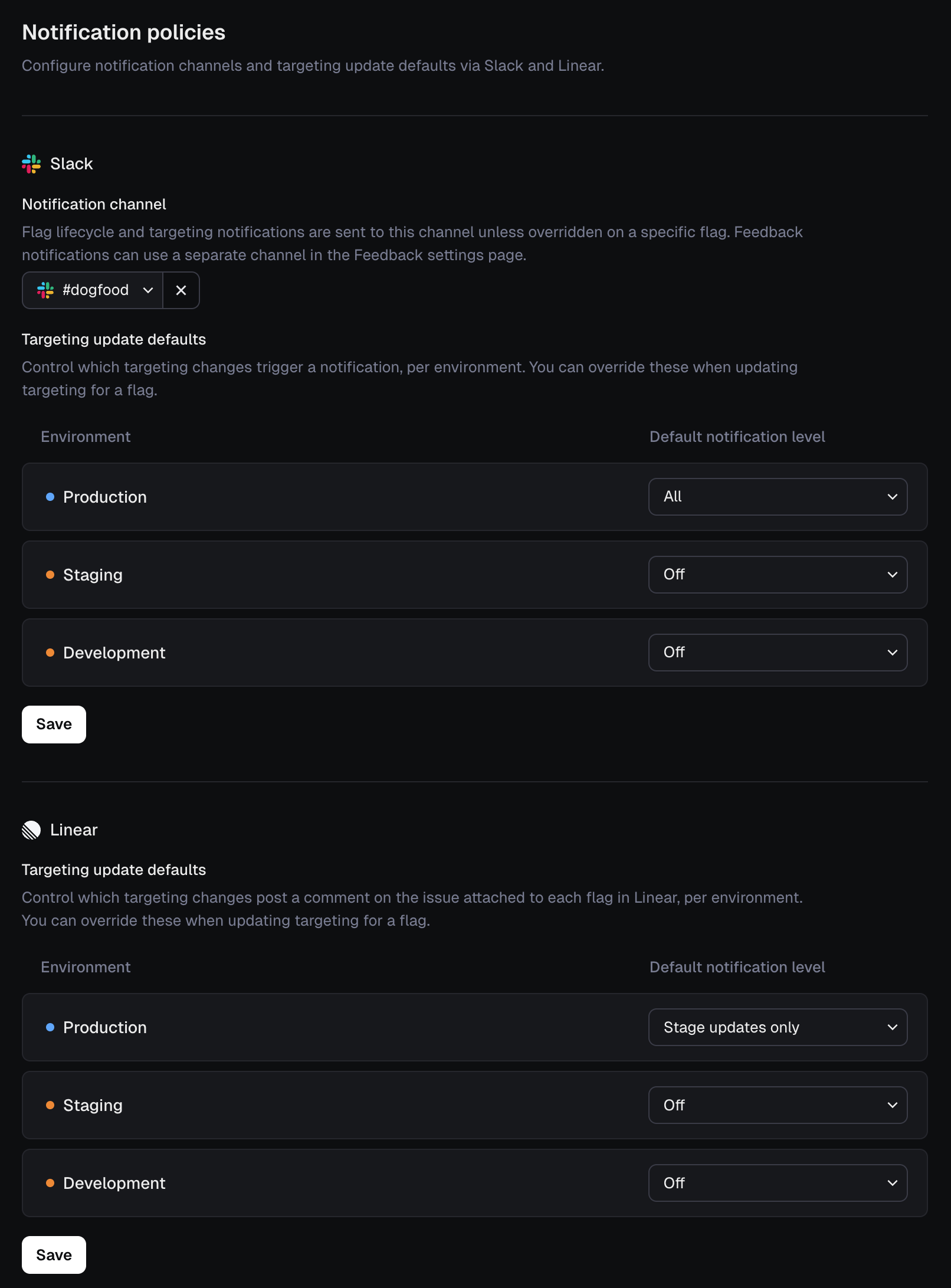
It gives you one place to control how Reflag posts targeting updates to Slack and Linear by default.
When updating targeting these defaults are preselected, but you can always override them before saving the change.
You can find it in Settings → Notification policies. See the docs for full details
Happy shipping!
User Details Page
·
·
Reflag was originally built for B2B SaaS companies. Since launch, we’ve had a Company page that lets you:
- See all flags and whether they’re enabled for that company
- Toggle flags on or off for that company
- View when someone at that company was first and last exposed to each feature
But not every product has a company or organization-level entity. And even when they do, flag data is often just as important at the individual user level.
When you’re handling a support request or debugging an issue, it’s incredibly helpful to know exactly which features were enabled for a specific user — and when.
To make this easier, we’ve introduced a dedicated User Details page. It mirrors the functionality of the Company page, but scoped to an individual user.

You can access it via Segments → Users, then select the user you want to inspect.
React Native SDK (beta)
·
·
We've launced a new React Native SDK (beta). It's a lightweight React Native wrapper around @reflag/react-sdk that makes it easy to feature-flag in React Native apps.
This release gives you the core parts of Reflag in your mobile apps, supports flag evaluation with hooks, and includes patterns for refreshing flags on app lifecycle events.
How to get started
Install the package:
$ npm i @reflag/react-native-sdkWrap your app:
import { ReflagProvider } from "@reflag/react-native-sdk";
// ...
<ReflagProvider>{/* app */}</ReflagProvider>
Read a flag:
import { useFlag } from "@reflag/react-native-sdk";

function StartHuddleButton() {
  const { isEnabled, track } = useFlag("huddle");
  if (!isEnabled) return null;
  return <Button onPress={() => track()}>Start Huddle</Button>;
}
See the documentation for detailed instructions on how to get started.
Happy shipping!
Migrate from LaunchDarkly in one day
·
·
We've made it much easier to migrate to Reflag from LaunchDarkly.
- The new Flag importer lets you import your flags and segments from LaunchDarkly in just a few minutes
- Our pre-built LLM prompt kick-starts your code migration to Reflag
- Reflag is free until your next LaunchDarkly renewal!

See https://reflag.com/migrate/launchdarkly for details on how to get started.
n8n node
·
·

We’ve created a Reflag node for n8n, enabling you to use Reflag in your automated and agentic workflows.
n8n is a workflow automation tool. You can use it to implement multi-step AI agents and integrate with hundreds of apps. Now you can connect Reflag too, with our community node.
The Reflag node supports all the same end-points as our REST API, including the ability to list applications, get details of an app, list flags for an app, as well as get and update flag targets.
This means you can integrate your back-office systems with Reflag's flag targeting. By using the Reflag node, you can provide access to specific flags for a company or user directly from your systems.
To get started, you’ll need to generate an API key, and add it to the Reflag node credentials. For more information, check out the node package on npm.
Linear icon syncing
·
·
Last week, we added flag icons in Reflag. Now, to make recognizing projects across Linear and Reflag easier, we’ve added icon syncing.
For flags with an associated Linear issue or project, the same icon and color used in Linear will be set for the flag in Reflag. If you change your mind, any icon changes made on Linear are reflected on Reflag, too.
Since Linear’s icons are custom, the icon graphic won’t match the one used in Reflag exactly. There are also some icons we don’t have equivalents for.
If you’ve already connected Linear with Reflag, syncing is live now, so you’ll start to see matching icons appearing for the flags with a connected Linear project or issue.
Otherwise, to get started, you can integrate Linear with Reflag from the Integrations page under Settings or check out the docs.
If you don’t want to use the same icon, you can still set your own flag icon in Reflag. Icon syncing is disabled when you manually pick a flag icon.
Flag icons
·
·
To make flags more recognizable and to help you better organize them, we’ve added flag icons.
You can now select a custom icon for any of your flags. Choose from 230 icons or 1,800+ emojis to capture the right look and feel.
Each icon can be set with one of 9 preset colors, or any hex color code you like, and we’ll automatically adjust the contrast to fit your chosen theme.
To set an icon, head to Settings for that flag under Flags, and click on the icon box next to the Name field.
The UI is clearly inspired by Linear - for good reason... we now sync icons from Linear, too.
Happy flagging!
Cursor rules and slash command templates
·
·

We’ve added Cursor rule and custom slash command templates to our docs, so you can get the coding agent to create a new flag and wrap the code it creates with it.
Cursor recently added the ability to create custom Slash commands, which are reusable prompts for common requests. You can create one to flag your code, using /flag in the Agent input and selecting the command from the dropdown menu.
Better yet, add a Cursor project rule to flag your code. Rules provide persistent, reusable context at the prompt level. Project rules are stored in `.cursor/rules`, are version-controlled, and scoped to your codebase.
To get started, check out the templates in our docs.